AI golf coach and caddie
Film your swing and see what to fix, drawn on your own body. On the course, get the right club from live wind, air and elevation.
Free in your browser. No sensors, no sign-up.
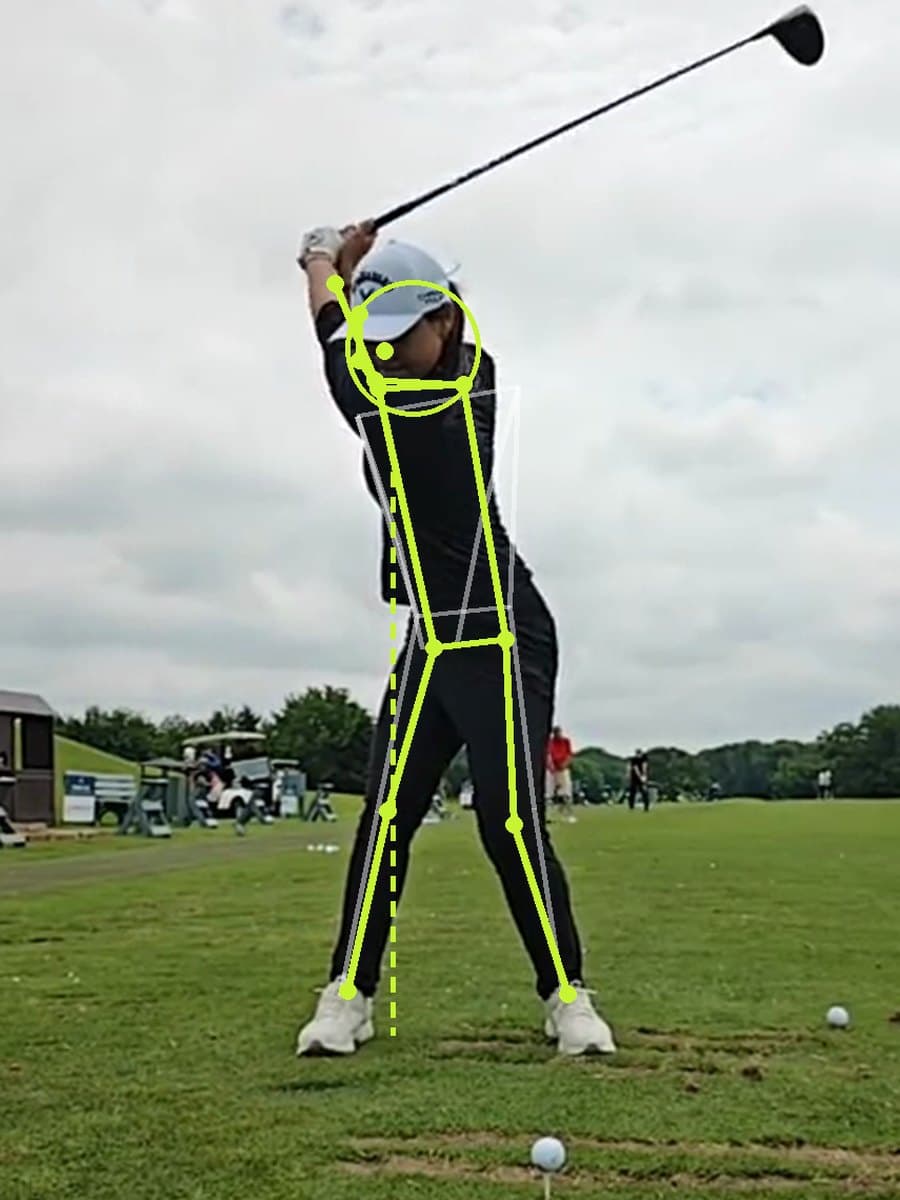
Swing coach
One video in, a lesson out. The pose model finds your swing, grades each position and picks the fix that matters most.
Address, top, impact and finish, found for you
33 body points per frame. Your address position becomes a ghost on every other frame, so you see exactly where you drifted.
Backswing to downswing timing, measured from your video. Tour players average about 3 : 1.
Shown on your body
Head circle, trail-hip wall, spine line and lead-arm line. Red where you broke, lime where you should be.
A fix, a drill and a feel
Every fault comes with what is happening, why it costs you, the drill with reps and a few-word feel cue.
Ask it anything
The coach looks at your frames and numbers. Ask why you slice, how to add 10 yards, or for a 15 minute range plan.
AI caddie
Every number explained. The caddie shows what the wind, air, slope and lie are each worth in yards, then calls the club.
Pick a hole and the caddie sets the tee and the green
Greens, fairways, bunkers and water drawn over satellite imagery, with the trouble near the pin called out in yards.
Hear the call
One tap reads the yardage, club and aim point out loud, so your phone stays in your pocket.
Legal in competition
Distance only, with wind, temperature, elevation and club advice switched off under Rule 4.3.
Your swing and your course in one coach
Swing apps know your swing but not your course. GPS apps know your course but not your swing. GolfTips.ai connects the two.
If your miss under pressure is a block because your hips stall, the caddie aims you left-center on the hole with water right, and the coach gives you the drill to fix it on the range.
Start with your swingHow GolfTips.ai compares
Based on each product's published features as of October 2026.
Frequently asked questions
Does my swing video get uploaded?+
No. Pose tracking runs in your browser on your own device. Only when you ask the AI coach a question do the four key frames and your measurements get sent, so the coach can see them.
What camera angle should I use?+
Face-on (camera facing your chest) checks sway, turn, weight shift, tempo and balance. Down the line (camera behind your hands, pointing at the target) checks posture, early extension and head height. Keep the phone around waist height with your whole body in frame.
How does the caddie get a plays-like number?+
It takes the map distance from ball to pin, then adjusts for air density (temperature, humidity and pressure, which covers altitude), the wind along and across your shot line, the elevation change to the pin, and your lie. Every adjustment is listed in yards so you can see why.
Can I use it in a tournament?+
Turn on tournament mode. It shows distance only, with wind, temperature, elevation and club advice switched off, which is what Rule 4.3 allows when the committee permits distance-measuring devices.
Are the club distances mine?+
Start with typical carries and edit each club in the caddie. Your numbers stay on your device.